Cloudflare Logpush
Cloudflare pushes your site's request logs to ByDefault. For Cloudflare Enterprise plans.
 JoshUpdated 2 min read
How it works
Logpush lets you send Cloudflare request logs to third-party sources. We only store verified AI requests and never store human requests or sensitive information like IP addresses.
HTTP request logs through Logpush need Cloudflare's Enterprise plan. On any other plan, use the Analytics API or a Worker.
Set up the job
In ByDefault, open Analytics, click Connect your site, then pick Cloudflare and Logpush.
-
Open your zone's Logpush settings. Click Create a Logpush job, pick HTTP destination, and paste your endpoint URL from the setup as the HTTP endpoint. Click Continue. Your token is part of the URL:
HTTP endpoint -
Pick HTTP requests as the dataset.
-
Name the job ByDefault Crawler Logs, make sure at least these fields are checked, then save the job.
FieldsWorkerSubrequest lets ByDefault leave out requests your own Workers make, so they don't count twice. ClientIP is checked against each AI provider's official IP ranges to catch fake crawlers, then discarded. We do not store any IPs.
-
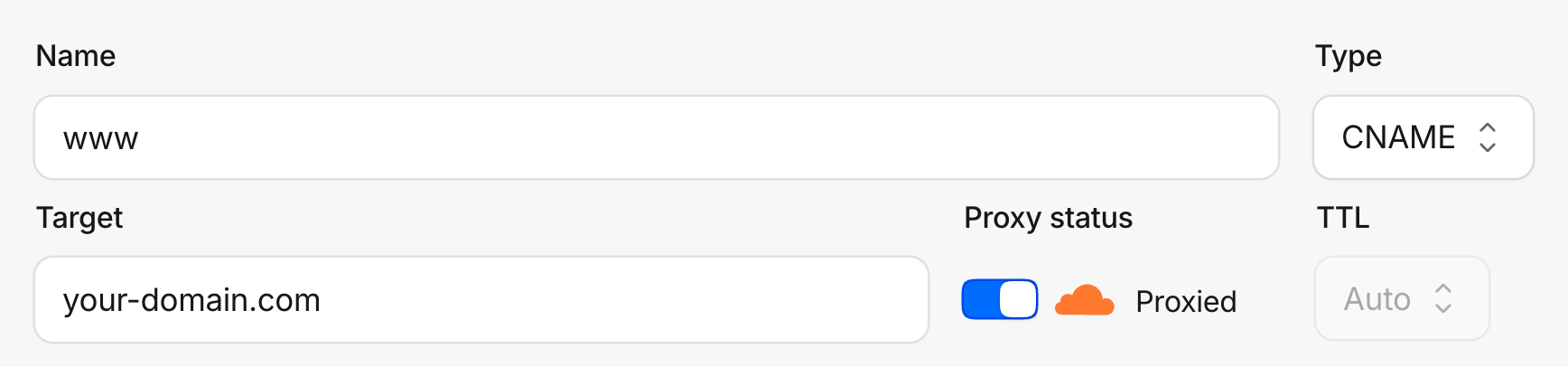
Under DNS → Records, make sure the A, AAAA or CNAME records for your domain show the orange cloud, Proxied. On a grey cloud, traffic bypasses Cloudflare and never reaches its logs.
Check the connection
When you click Continue in step 1, Cloudflare checks the endpoint, and the setup's last step reads Cloudflare reached your endpoint. Once the job is saved, its first batch arrives within a minute and the step turns green.
Troubleshooting
It still says Cloudflare reached your endpoint
The URL and token work, but the job hasn't sent a batch yet. Check that you saved the job, that it's enabled, and that its dataset is HTTP requests.
Did this answer your question?