Cloudflare Analytics API
ByDefault reads your site's traffic from Cloudflare with a read-only token. No code, any Cloudflare plan.
 JoshUpdated 2 min read
How it works
You give ByDefault an API token that can read your zone's analytics and nothing else. Available on all Cloudflare plans, including the free plan.
Set up the connection
In ByDefault, open Analytics, click Connect your site, then pick Cloudflare and Analytics API.
-
Open your API tokens in Cloudflare. Click Create Token, then Get started under Custom token, and set:
Click Continue to summary, then Create Token, and copy the token.
-
Open your domain's overview in Cloudflare. Under API in the right column, copy Zone ID.
-
Paste the Zone ID and the API token into the setup and click Connect. ByDefault checks the token with Cloudflare before saving it, so a missing permission shows up right there.
-
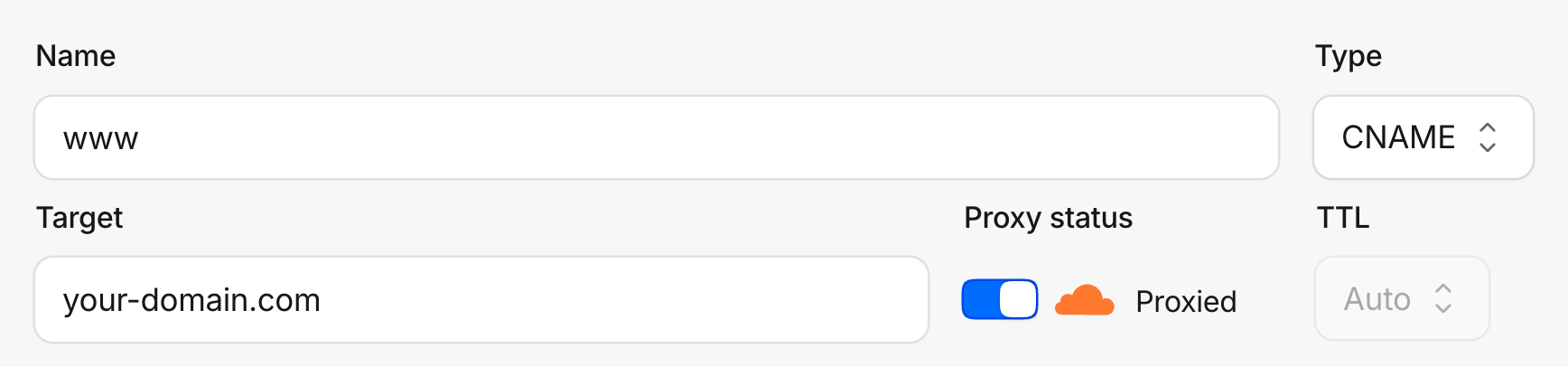
Under DNS → Records, make sure the A, AAAA or CNAME records for your domain show the orange cloud, Proxied. On a grey cloud, traffic bypasses Cloudflare and there's nothing to report.
Check the connection
Once you connect, the setup reads Waiting on first data until Cloudflare's first report comes in, then the last step turns green. ByDefault keeps checking, so you can close the window.
Troubleshooting
Connect says the token doesn't work
Check the token's permission is Zone, Analytics, Read, and that its zone is the domain you're connecting. Then copy the Zone ID again from that domain's overview.
It says Cloudflare stopped answering
The token was deleted or lost its permission. The message under it is Cloudflare's own. Click Disconnect, create a new token and connect again.
Did this answer your question?